WordPress Permalinks Not Working: Rewrite Rules, .htaccess and Nginx
When pretty URLs return 404 but the homepage loads, the server is not routing requests into WordPress. Fix the rewrite layer instead of changing the permalink structure.
Quick fix: go to Settings → Permalinks and click Save Changes without touching the selected structure. That rewrites the rules and resolves the majority of cases. If the 404s return, the server configuration is overwriting or ignoring those rules.
Do not switch to Plain permalinks to "make it work". That changes every URL on the site and trades a rewrite problem for an SEO one.
Identify what is actually broken
Test four URLs while logged out:
| URL | What a failure tells you |
|---|---|
| Homepage | If this fails too, it is not a permalink problem — see site not loading |
| A post with a pretty URL | Fails alone → rewrite rules or one bad slug |
/?p=123 for a known post |
Works while pretty URL fails → rewrite layer confirmed |
| A category archive | Fails while posts work → taxonomy rewrite or slug conflict |
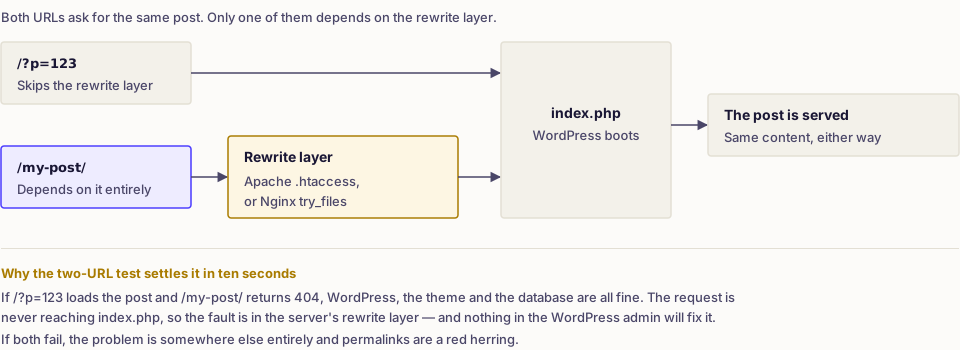
If /?p=123 loads the post and /my-post/ returns 404, WordPress and the database are fine. The web server is not passing the request through.
Flush the rewrite rules properly
The Permalinks screen regenerates rules on save. With WP-CLI:
wp rewrite flush --hard
wp rewrite list --format=table | head
--hard also asks WordPress to rewrite the .htaccess block. If the rules come back but the 404s return within hours, something is regenerating the file — a security plugin, a caching plugin or a deployment process that ships its own .htaccess.
Repair the .htaccess block on Apache or LiteSpeed
WordPress needs its block present and reachable. Back up the file first, then confirm it contains the standard block:
# BEGIN WordPress
<IfModule mod_rewrite.c>
RewriteEngine On
RewriteRule .* - [E=HTTP_AUTHORIZATION:%{HTTP:Authorization}]
RewriteBase /
RewriteRule ^index\.php$ - [L]
RewriteCond %{REQUEST_FILENAME} !-f
RewriteCond %{REQUEST_FILENAME} !-d
RewriteRule . /index.php [L]
</IfModule>
# END WordPress
Things to check around it:
- The WordPress block must not sit below a rule that ends processing, such as a redirect with
[L]that catches everything. - If the site lives in a subdirectory,
RewriteBaseand the final rule must include that directory. - The file must be writable by WordPress if you want the Permalinks screen to maintain it; otherwise WordPress shows the rules for you to paste in manually.
mod_rewritemust be enabled. If it is not, no.htaccesscontent helps and the host has to enable it.
Never copy an .htaccess file from another site. Multisite, subdirectory installs and security plugins all need different content.
Check the Nginx configuration
Nginx does not read .htaccess. A WordPress site needs a location block that falls back to index.php:
location / {
    try_files $uri $uri/ /index.php?$args;
}
If pretty URLs broke immediately after moving to a new host or a new stack, this is the first thing to check. The change belongs in the server configuration and requires a reload, so on managed hosting you may need to ask support rather than edit it yourself. Do not paste Apache directives into an Nginx configuration — they are ignored at best.
Permalinks that broke after a migration
Three separate causes look identical from the browser:
- Rules were never flushed on the new server. Save permalinks once.
- The structure differs between old and new sites. Compare Settings → Permalinks on both. If the old site used
/%postname%/and the new one uses/%year%/%postname%/, every old URL is now wrong and needs redirects. - The site URL is wrong. Check
siteurlandhomein Settings → General or the constants in wp-config.php.
When the structure genuinely has to change, map old URLs to new ones and serve one direct 301 for each. The detail is in how to fix WordPress 404 errors.
Custom post types returning 404
Rewrite rules for a custom post type are registered by the plugin or theme that creates it, and they only enter the rules table when the rules are flushed.
- Save permalinks once after activating the plugin.
- Check that the post type's
rewriteslug does not collide with an existing page slug. A Page called "Events" and a post type with slugeventscannot both own/events/. - If you register the type in code, flush on activation only — never on every page load, which is a measurable performance cost.
Slugs that keep gaining numbers
WordPress appends -2 when a path is already taken. The owner is often invisible at first glance:
- a draft or scheduled post with the same slug;
- an item in the trash — empty the trash to release it;
- an attachment page created when a file was uploaded with that name;
- a page, category or tag using the path.
Search all post statuses for the slug before assuming a bug. Attachment pages are the usual culprit on image-heavy sites.
If a URL now works but goes through more than one redirect on the way, that chain is worth collapsing — the redirect checker shows each hop.
Verify the repair
With caches purged, confirm that a post, a page, a category archive, a paginated archive (/page/2/) and a custom post type single all return 200. Then check that /wp-admin/ still works and that any security rules you disabled during testing are back in place.
Frequently asked
- Only if you change the selected structure. Clicking Save Changes with the same option selected rewrites the rules and leaves every URL as it was.
- Another object already owns that slug — usually a draft, a trashed post, an attachment page or a page with the same name. WordPress appends a number to keep paths unique.
- Yes. Nginx ignores .htaccess entirely and needs a try_files directive in the server configuration to route unmatched requests to index.php.