WordPress Post Revisions Explained
A revision is an ordinary row in the posts table with a different post type. That explains what it saves, what it silently omits, and why the database bloat panic is usually overstated.
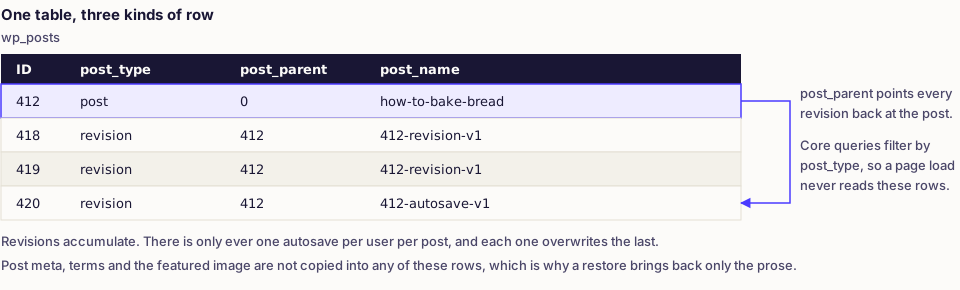
What a revision actually is: a row in wp_posts with post_type set to revision and post_parent set to the post it belongs to. It is not a diff, not a separate table and not a log. Once you see it as an ordinary post of an unusual type, everything else on this page follows.
What gets saved, and what does not
A revision copies the versioned fields of the post: title, content, excerpt, and the author and timestamp of the change. That is close to the whole list.
| Data | Versioned? |
|---|---|
| Title, content, excerpt | Yes |
| Post meta and custom fields | No, unless a plugin adds support explicitly |
| Categories, tags and other terms | No |
| Featured image | No, it is stored as meta |
| Menu order, template choice, status | No |
| Block markup inside the content | Yes, it is part of the content |
That second row causes most of the confusion. Restoring a revision on a page built with a field plugin brings back the prose and leaves today's field values in place, which looks like a partial restore because it is one. Plugins that advertise revision support, including Advanced Custom Fields, do extra work to store and restore their own values alongside the revision.
Autosaves are revisions too, almost
The editor autosaves while you type. That autosave is also stored as a revision row, distinguished by its slug ending in -autosave-v1, and there is only ever one per user per post — each autosave overwrites the last. Ordinary revisions accumulate; autosaves do not.
This is why a post you never published can still have a recoverable draft, and why disabling revisions does not disable autosaving. The two are configured separately.
The bloat question, honestly
Revision counts sound alarming. A post edited fifty times carries fifty extra rows, and a site with two thousand posts can hold tens of thousands of revisions. Whether that matters depends on what reads the table.
Core queries filter by post_type, so a normal page load never touches revisions. The real costs are narrower:
- Backup and migration size. More rows means larger dumps and slower restores.
- Badly written plugin queries. Anything running a broad read over
wp_postswithout filtering post type pays for every revision. - Admin list screens on posts with very long revision histories.
Count them before deciding it is a problem:
SELECT COUNT(*) FROM wp_posts WHERE post_type = 'revision';

-- The worst offenders, so you know whether it is broad or a few pages.
SELECT post_parent, COUNT(*) AS revisions
FROM wp_posts
WHERE post_type = 'revision'
GROUP BY post_parent
ORDER BY revisions DESC
LIMIT 20;
If the answer is a few thousand rows on a site with a working backup routine, leave it alone. Editorial history is worth more than the disk space.
Limiting revisions with WP_POST_REVISIONS
The setting lives in wp-config.php, above the line that requires wp-settings.php, as wp-config.php explained describes:
// Keep the last five revisions per post.
define('WP_POST_REVISIONS', 5);

// Or switch them off entirely. Autosave still runs.
// define('WP_POST_REVISIONS', false);
Five is a sensible default for most sites. It preserves a working undo history without unbounded growth. Setting it to false is a decision to have no editorial history, which is defensible on a single-author site and a poor idea anywhere several people edit the same pages.
The constant applies site-wide. To vary it by post type, filter it instead:
add_filter('wp_revisions_to_keep', function (int $num, WP_Post $post): int {
    // Long-lived articles keep more history than throwaway landing pages.
    return $post->post_type === 'landing_page' ? 2 : 10;
}, 10, 2);
Neither approach deletes anything retroactively. Lowering the limit trims a post's history the next time that post is saved, so old revisions on posts nobody edits stay where they are.
Cleaning old revisions safely
Back up first, per how to back up a WordPress site. Then use something that handles the cascade, because a revision can have its own meta rows and term relationships.
With WP-CLI:
# Check the scale first.
wp post list --post_type=revision --format=count

# Delete them properly, letting WordPress clean up related rows.
wp post delete $(wp post list --post_type=revision --format=ids) --force
Without CLI access, use a maintenance plugin rather than raw SQL — the options are covered in WordPress database management plugins. A bare DELETE FROM wp_posts WHERE post_type = 'revision' removes the revisions and leaves their wp_postmeta and wp_term_relationships rows orphaned, which is how a cleanup ends up needing database repair.
After a large deletion, optimise the affected tables so the freed space is actually reclaimed.
Restoring, and its limits
Open a post, find Revisions in the sidebar, and compare side by side. Restoring writes the chosen version's title, content and excerpt over the current values, and creates a new revision of what you replaced — so restoring is itself undoable.
Two limits to remember. Meta and terms do not come back, as above. And the revision browser shows nothing when a post has only one saved state, which reads as broken but is correct.
Why revisions are missing entirely
- The post type does not support them. Revisions require
revisionsin the type'ssupportsarray. Pages and posts have it; a custom type registered without it silently has no history, as custom post types explained covers. WP_POST_REVISIONSisfalse, often set by a host or a performance plugin without telling anyone.- A cleanup plugin runs on a schedule and has already removed them — though whether that schedule actually fires on time is its own question, covered in how WP-Cron works and why it misses.
- The content never changed after publishing. No edit, no revision.
Common mistakes
- Disabling revisions to fix a speed problem that revisions were not causing. Measure first, and see speeding up the WordPress admin for what usually is.
- Deleting revisions with raw SQL and leaving orphaned meta behind.
- Expecting a restore to bring back custom fields. It will not.
- Assuming a lower limit prunes history immediately. It applies on the next save of each post.
- Using revisions as a backup. They live in the same database that fails.
- Copying a page to keep an old version. That creates a competing URL. Use the revision history, or duplicate a page knowingly.
Verify
Edit a published post twice, saving between changes, then open the revision browser and confirm both states appear with the right author and time. Restore the earlier one and check that the content reverted and a new revision was created. Then set your limit, save an old post three times, and confirm the count for that post settles at the number you chose.
Frequently asked
- Rarely by themselves. Core queries filter by post type, so revisions sit outside them. The genuine costs are backup size and any poorly written plugin query that reads the posts table without filtering.
- Post meta is not versioned. A revision copies the title, content and excerpt, not the meta rows. Field plugins that offer revision support hook in specifically to store and restore their own values.
- Only if you also remove the meta rows and term relationships that pointed at them. Deleting from the posts table alone leaves orphaned rows behind, so use WP-CLI or a maintenance plugin that handles the cascade.