How to Add a WordPress Admin User via phpMyAdmin
Locked out with only database access? Insert a row into wp_users, then two rows into wp_usermeta that grant the administrator role. Both halves are required.
Before you start: export the database. A mistyped INSERT is easy to undo with a backup and tedious without one — how to back up a WordPress site covers the quickest way to get a copy.
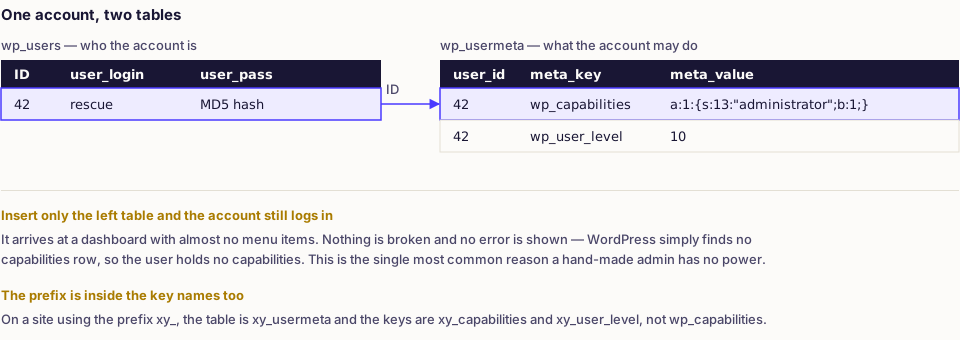
Two tables are involved. Inserting into wp_users alone creates an account that can log in and do nothing; the role lives in wp_usermeta.
Step 1: find the table prefix
Open wp-config.php and read:
<?php
$table_prefix = 'wp_';
Many hosts randomise this. Every statement below must use the real prefix, including inside the meta key names.
Step 2: insert the user
In phpMyAdmin, select the database, open the SQL tab and run:
INSERT INTO wp_users
    (user_login, user_pass, user_nicename, user_email, user_registered, user_status, display_name)
VALUES
    ('rescue', MD5('a-long-unique-passphrase'), 'rescue', 'you@example.com', NOW(), 0, 'Rescue Admin');
Note the new row's ID. If phpMyAdmin does not show it, find it:
SELECT ID FROM wp_users WHERE user_login = 'rescue';
You can also do this through the interface: open wp_users, choose Insert, fill in the fields, and select MD5 in the Function column beside user_pass.
Step 3: grant the administrator role
Replace [ID] with the number from the previous step:
INSERT INTO wp_usermeta (user_id, meta_key, meta_value)
VALUES ([ID], 'wp_capabilities', 'a:1:{s:13:"administrator";b:1;}');

INSERT INTO wp_usermeta (user_id, meta_key, meta_value)
VALUES ([ID], 'wp_user_level', '10');
Two details matter:
- The
meta_valuefor capabilities is a serialised PHP array. Copy it exactly — the numbers ina:1:ands:13:are lengths, and changing a character breaks it. - The meta keys are prefixed. On a site with prefix
xy_, they arexy_capabilitiesandxy_user_level, even though the table isxy_usermeta.
wp_user_level is legacy but some older code still reads it, so it costs nothing to include.
Promoting an existing user instead
Creating an account is the wrong move when the account already exists and has simply lost its role — a plugin that rewrote capabilities, a botched role-editor change, or a membership plugin that demoted everyone on deactivation. Update the existing row rather than adding a second administrator:
UPDATE wp_usermeta
SET meta_value = 'a:1:{s:13:"administrator";b:1;}'
WHERE user_id = [ID] AND meta_key = 'wp_capabilities';
If that returns zero affected rows, the row does not exist and the INSERT from step 3 is what you need. This matters: UPDATE silently does nothing when nothing matches, which reads as success.
Verify before you leave phpMyAdmin
Confirm both halves landed on the same user rather than on two different ones:
SELECT u.ID, u.user_login, m.meta_key, m.meta_value
FROM wp_users u
JOIN wp_usermeta m ON m.user_id = u.ID
WHERE u.user_login = 'rescue'
  AND m.meta_key IN ('wp_capabilities', 'wp_user_level');
Two rows come back on a correct insert. One row, or none, tells you which statement failed before you spend time at a login screen that was never going to work.
Step 4: log in and tidy up
Go to /wp-login.php and sign in with the new credentials. If the account works:
- Change the password from within WordPress so it is hashed with the current algorithm.
- Fill in the profile — first name, display name — so the account is identifiable later.
- Check Users for accounts you do not recognise.
- Delete the rescue account when the real one is restored, and reassign its content rather than deleting it.
If the login fails
| Symptom | Cause |
|---|---|
| "Unknown username" | Wrong table prefix, or you edited another site's database |
| Password rejected | Plain text was stored instead of an MD5 hash |
| Logs in, dashboard is nearly empty | Missing or malformed wp_capabilities row |
| Redirects back to login | Cookie or URL mismatch — see the redirect loop guide |
| Multisite: no network admin | Needs a super_admin entry in the network's sitemeta table |
Easier alternatives when you have them
WP-CLI, if SSH is available:
wp user create rescue you@example.com --role=administrator --user_pass='a-long-unique-passphrase'
A must-use plugin, if you have file access but no database access. Create wp-content/mu-plugins/rescue.php:
<?php
add_action('init', function () {
    if (username_exists('rescue')) {
        return;
    }

    $id = wp_create_user('rescue', 'a-long-unique-passphrase', 'you@example.com');

    if (! is_wp_error($id)) {
        (new WP_User($id))->set_role('administrator');
    }
});
Load one page, then delete the file. Leaving it in place means anyone who reads it has your credentials.
If you only need to get back into an existing account rather than create a new one, resetting the admin password is less invasive.
If the account already exists and only the password is lost, the WordPress password hash generator produces a strong passphrase and the matching hash in your browser, along with the scoped UPDATE statement.
A note on why you were locked out
Creating an emergency administrator is a symptom, not a cure. Work out which it was: a forgotten password, a broken email pipeline, a plugin that removed your capabilities, or someone else changing your account. That last case needs the full response in how to fix a hacked WordPress site — an attacker who can edit the users table can also do everything else.
Frequently asked
- Because the role is stored in wp_usermeta, not wp_users. Without a wp_capabilities row containing the administrator value, the account is effectively a subscriber with no menu items.
- Use the actual prefix everywhere, including inside the meta key names. The meta keys are built from the prefix, so a site using xy_ needs xy_capabilities and xy_user_level.
- For this one-off insert, yes. WordPress accepts the MD5 hash at the first login and immediately re-hashes it with its current algorithm.